Category: Blog

  • Octopress: Six Months Later

    When I was a week into this blog, I wrote down some of the reasons I liked Octopress, my initial impressions of it as a blogging platform and whether it could compete or replace WordPress. It was a leap for me, a WordPress developer and long time fan of the platform. In general I have found Octopress to be an interesting experiment in hacker blogging but am back to WordPress as of this entry.<!–more–>

    Starting, as before, with what I (still) like about Octopress. There is still a lot to like.

    1. I love writing in Markdown. WordPress.com recently added Markdown support, so it’s only a matter of time before I can write in Markdown here without a plugin, but being able to practice What You See is What You Mean (WYSIWYM) while blogging without writing straight HTML is really quite convenient. When I write on WordPress blogs at work I often forget it’s either straight HTML (too cumbersome) or the TinyMCE What You See Is What You Get (WYSIWYG) editor (too unreliable).
    2. Simple local previews are another thing I really love. rake preview is up there with Django’s ./manage.py runserver test server in simplicity. What I would change is that the rake server is not nearly as competent as Django’s when it comes to compiling sites after making changes and letting you know about errors. For example, using quotation marks in categories causes errors in site generation with Octopress but the only output in the preview terminal is the somewhat unhelpful WARN Could not determine content-length of response body. Set content-length of the response or set Response#chunked = true. Nevertheless it is quite simple to get a full, local, site preview while you’re still editing.
    3. Accidental publishing happens less frequently. This relates to 2 in that you have to be pretty deliberate about publishing the post for the world to see. Saving the file locally preserves your work. rake preview let’s you see it in a browser (almost) exactly as it should appear. Getting it out in the public, however requires rake gen_deploy run from the terminal.

    With all that said, Octopress has a long way to go. Most of what I missed is WordPress’s user interface and content management features.

    1. Drafting posts. In WordPress, your post isn’t given a published date until you hit Publish, at which point it records the exact moment in time you hit publish as the date posted. In Octopress, this timestamp is added as soon as you execute rake new_post[]. I’m a drafter. Sometimes I’ll start three blog posts at once to get some ideas on the page and then put them aside until I have time work on them. (I started this one on January 1 and look at me now.) December 23, for example, I wrote Why Unit Testing Matters in one go. But I also started two follow on posts about writing good unit and integration tests. I ran rake new_post three times and each post had the same publish date even though the last two hadn’t been published yet! When I rake deployed, I had the post I wanted buried under two empty posts. When I finally finished the first of the others it was 2014 and I had to manually change the date and time as well as the published status. Manually managing these publish times was a bit of a nightmare.
    2. Visualizing published work. A blogging UI that can list posts and organize them by date and time published or category is incredibly useful when trying to reference older works. As is being able to quickly copy the permalink out of the admin (or right within the post editing UI in WordPress) and paste it into a link block. Octopress has no such mechanism and URLs can get really long. In fact, the permalink structure I’m using here is consistent with Octopress to maintain backward compatibility and I’m more or less stuck with it even though I’d rather it be much shorter.
    3. Version control over posts. This doesn’t matter to me as much anymore as it did in August. Markdown doesn’t version control very well anyway since lines are sometimes thousands of lines long. Also, with WordPress’s new drafting system, keeping track of changes in the post content is trivial and much more visual that it ever has been.
    4. Getting out. WordPress’s export/import functionality made switching to Octopress and it would have made switching back easy except that Octo has no similar feature. The upshot is that everything in Octo is straight HTML so importing wasn’t terribly difficult, but, manually re-entering the posts was time consuming and I’d rather not repeat it.

    Paul Graham tweeted recently that static sites are “the fixies of the Internet”. I found that a compelling metaphor. To extrapolate it to my favorite bike company, WordPress is a complete Long Haul Trucker. Well built, tough and reliable enough to last you a long time. Octopress is the Cross-Check frame. It looks like it can do a lot but it’s unclear whether it’s a fixie, for touring, commuting, or something else entirely. The DIY aspects have a lot of advantages but also puts a lot of pressure on the user to decide what to do with it. Octopress clearly has a lot of advantages. But at the end of the day all I really want is to sit down and write a blog.
  • How can I use PHP Namespaces in WordPress Plugins

    PHP has long had a problem of naming collisions. Because older versions of PHP had no way of declaring methods outside the global space, developers came up with several different ways of preventing and checking for namespace collisions, none of which treated the underlying condition. These many and varied solutions begged for a unifying standard as they made things like autoloading and package management increasingly difficult. PHP 5.3 introduced a feature called ‘namespacing’ to solve this problem and WordPress developers should begin adopting. With proper namespacing, WordPress plugin and themes will become clearer, more stable, and more portable.

    (more…)
  • Writing Unit Tests for WordPress

    This post and others like it still get a strange amount of traffic. It’s worth noting the details here are out of date and I won’t be keeping it up. Use at your own risk!

    In my last post I wrote about two testing libraries for WordPress and briefly discussed the difference between integration tests and unit tests. I also mentioned a concept called test driven development (TDD) and breifly explained how it might help write better code from the start. This post will expand on that and show how to write a simple WordPress plugin from a test-first approach. Since we’re writing unit tests, we’re going to use WP-Mock to create a test double for us and we’ll use PHPunit for our test runner.

    TDD starts with a problem you want to solve—the same problem your plugin wants to solve. In this case, let’s say we have a plugin that will add some metadata to a post with the title “Test”. Since that’s going to require us to mock some WordPress core functionality, make sure WP-Mock is configured in your working environment. We’ll start by writing a test that verifies the metadata was attached to the post.

    (more…)
  • Why Unit Testing in WordPress Matters

    Testing WordPress has become a favorite topic of mine lately: moving away from hitting refresh and toward something more holistic, reliable, and automatable. I’ve written before about a testing method called called browser testing, which verifies a webpage has some expected behavior. These kinds of tests are great but they’re not perfect. They require a lot o dependencies and that someone else would need to verify your code. There is a better way, one that doesn’t require any of those dependencies and verfies the code down to the exact lines you wrote—it can even be independent of WordPress. It’s called unit testing and it will make you a better developer.

    (more…)

  • How can I use Feature Switches in WordPress

    While a colleague and I were discussing the rollout of a new feature to our public facing website, he asked me if it would be possible to “hide” the new content behind a toggle. Effectively, he was asking me to write a feature switch, a best practice of continuous integration that allows you to push some source code while hiding future features. WordPress has some of this idea built into it’s core: plugins, for example, can be activated and deactivated to turn things on and off. Within plugins and themes, options pages can be used to turn on different features. SEO plugins, for example, let users turn on and off different optimizaiton tools. Feature switches are a little different, and in our case leverage the power of Apache environment variables to show and hide different parts of our site.

    (more…)

  • How to Maybe Flush WordPress’s Rewrite Rules

    Custom post types and taxonomies are one of the most powerful tools to transform WordPress from a blogging platform to a full CMS. One of the most common problems beginning developers have when starting to use them is understanding how they work. It’s easy to think that calling register_post_type is all it takes only to discover that their new post type archives are not working. This likely leads to a long dive into first (hopefully) the code to see if something was written incorrectly and then to the WordPress support forums to figure out what the problem is. 99% percent of the time I wager it’s because the developer forgot to flush WordPress’s rewrite rules.

    (more…)

  • How can I do Browser Testing With WordPress

    Browser testing is a basic component of a concept called behavior driven development (BDD), and one that has helped me become a better WordPress developer in the last few months. The concept of BDD is simple: test and develop around your software’s expected behavior. I recently wrote about BDD for Excella’s company blog, and this post will go a bit more technical than that. The upshot of behavior testing is you can find problems with both your code and your requirements. Before we get into that, a bit of background on the tools.

    (more…)

  • How to Explain Git to Non-Developers

    Since starting with Excella in January I’ve found myself explaining git and the underlying concept of version control to a lot of non-developers. People like to ask me what I’m doing at my job, what I’m learning, and git was a big one I had to learn early on. What I usually focus on when explaining git is how it is fundamentally different from revision history tools like those included with Google Documents and other word processors.

    (more…)

  • A week into Octopress

    About a week ago I successfully migrated some of my posts from harmsboone.org to this blog, I also wrote a post about some things I learned about git that week. WordPress is great. I wouldn’t recommend it (and I almost always do) if it weren’t. For someone who wants to spin up a blog and maybe some day more in a pinch, WordPress is the go-to platform. In fact, the rest of harmsboone.org still runs it. Earlier this year, though, Danielle and I started talking about ditching the one-blog-for-both solution. When we were both living and teaching abroad sharing one blog made sense but now with the both of us starting different careers, we have different things to say.

    We decided to keep HarmsBoone.org as an archive of the last four years and also create new blogs for the both of us. Since I was starting from scratch anyway, might as well strike out with something new.

    (more…)

  • What I learned about git this week

    I love hidden features in software. Whether it’s finding a konami code in unexpected places or that I can add or remove all the dots and underscores to my gmail address I want and I’ll still get the emails, something about them are great. That was what made Zach Holman’s presentation ‘More Git & GitHub Secrets’ such an enjoyable read this week.

    (more…)

  • Tussle over Technology: Controversy & the Patent Act

    Abstract

    The United States Constitution instructed the First Congress of the United States to enact laws “securing for limited Times to Authors and Inventors the exclusive Right to their respective Writings and Discoveries.” This instruction, commonly referred to as the Intellectual Property Clause, demanded a set of laws based on the broad idea that inventors are best incentivized and remunerated for their works through a system of guaranteed exclusive rights. What exactly the scope of those rights were, who had authority to hand them out, and under what conditions they would be given, were all left to Congress to sort out; it was among the earliest controversies over science and technology in the United States of America.

    (more…)
  • 20 Years of Gustavus: A bird’s eye view

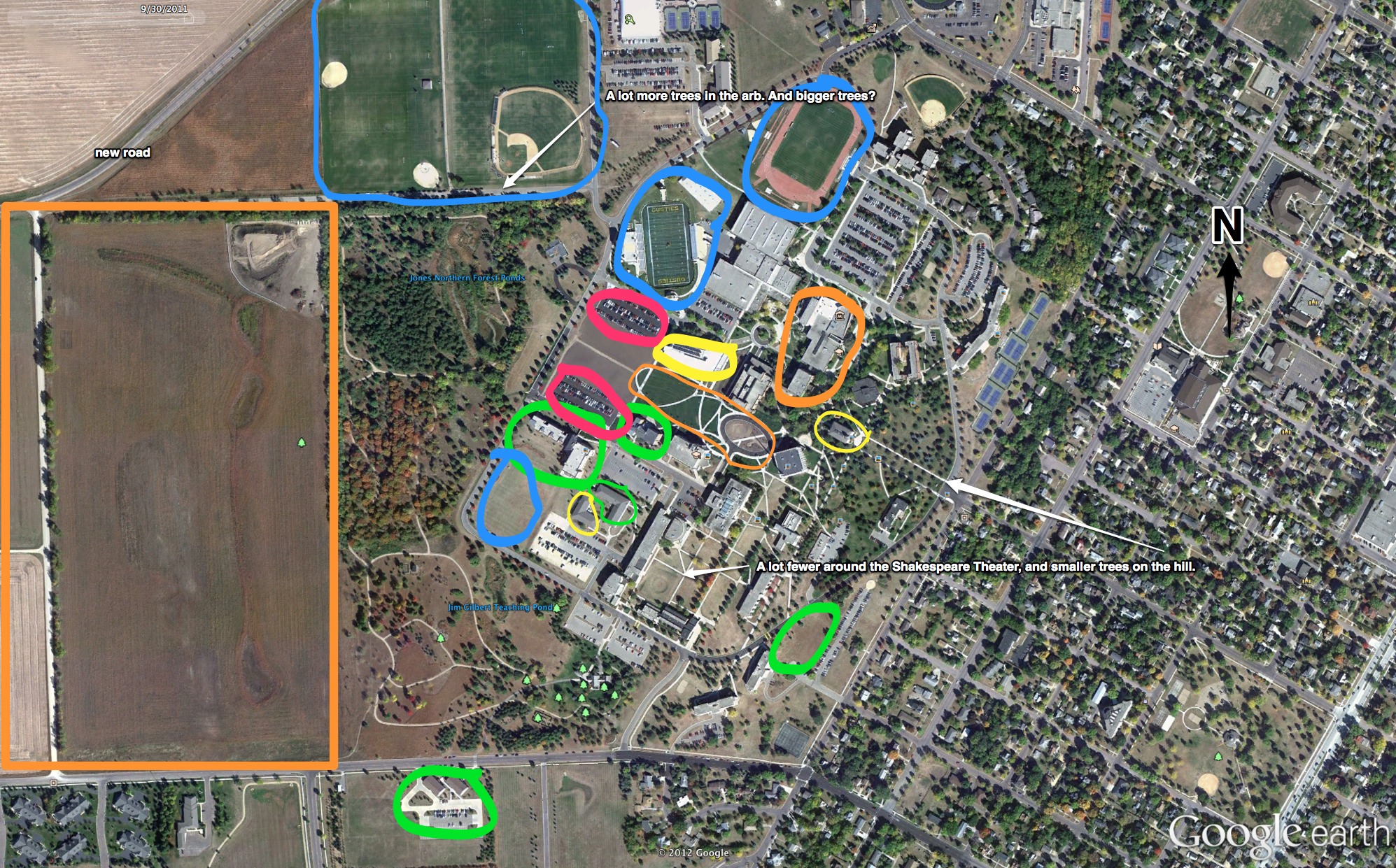
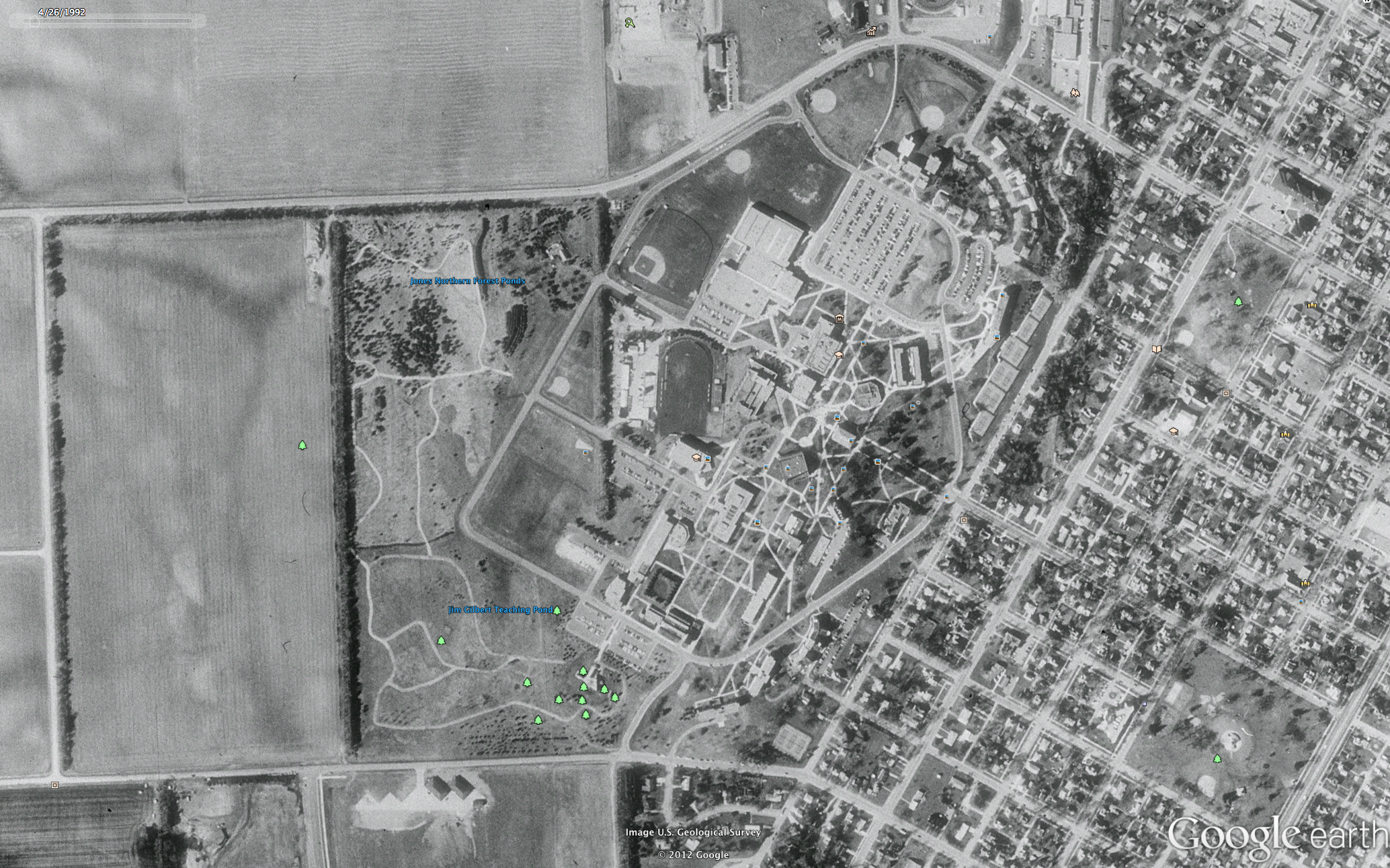
    Inspired by the Google Earth Time Machine blog highlighted by Kottke.org a few days ago, I decided to see how far back the imagery over my college campus reached. I figured it being in rural area, there was probably a lot of agricultural aerial photography going on, but I was wrong, the imagery only went back as far as 1992. Perhaps if I paid for some extra features it would stretch back further, but who knows. Those familiar with Gustavus Adolphus College will recall the infamous 1998 Tornado, the ten-year anniversary of which was commemorated while I was a student. The big thing I remember hearing about the campus was tree loss. The big takeaway watching the recruitment video from the 90s they were still using when I was a freshman was ‘where did all those giant trees on the quad go? What I did not think about, and what never really got talked about, was how many more trees there are now, and this was immediately evident comparing the 92 aerial imagery with the photographs taken 20 years later.

    Gustavus from above 2005

    One thing that was especially interesting was where there were more trees in 2012, where the trees were smaller, and where they were actually larger. The Linnaeus Arboretum sort of hugs the Westernmost part of the campus. In 2012 the Arb, as we affectionately knew it, is densely populated with trees on the North side, strikingly so compared to the same image in 1992. The South side is a bit more dense, but, since there’s more prairie on that end of the Arb, it’s not as noticeable. What’s strange here is that all the trees actually look a lot bigger, 20 years bigger, in fact. Did the Arb somehow survive the tornado, or was it replanted with really big trees? On the South-Southeast side of the campus, headed down the hill from (the old) Old Main the tree cover is definitely sparser in ‘92, but the trees much larger. There are also more paved paths headed up the hill from Rundstrom Hall, something I would have welcomed when I lived there.

    Apart from trees, the campus was busy constructing, moving, or demolishing campus facilities in the last twenty years. The facilities are highlighted on the 2012 map supra and color-coded according to whether they are sports (blue), academic (yellow), housing (green), public spaces (orange), and parking (red). I also made some notes in white. One thing is clear straight away, housing at Gustavus has changed a lot in the last twenty years. On the Southern edge of the campus were added the Arbor View Apartments, on the Western edge before the Arb, Southwest and Prairie View halls (the latter meant to be temporary after the tornado) and the International Center. On the South-Southeast side of campus (a barren patch of grass circled in green) was Wahlstrom Hall, a building demolished the summer before I enrolled. Gusties have also changed the way they play sports, with the football field moved to behind Lund Center on the North End of campus. The new stadium, built in the summer of 2007, is right next to a soccer field, and is across Ring Rd. from a baseball field and a multi-purpose field for practices (and other things? My golf class met there, I imagine that’s not all). All of these fields are either new or have moved since 1992. The 2012 stadium is directly atop the 1992 baseball field, and the 2012 baseball and multi-purpose fields appear to be atop 1992’s farmland. It’s not clear whether the rugby pitch behind Southwest Hall is new, or if it was so used in 1992. The 1992 football stadium is now covered by a mall stretching NE from Christ Chapel, one of two new public spaces. The others were an expansion of the campus center that happened after the tornado to include the Marketplace, and the creation of the Big Hill Farm West of the Arb.

    the Gustavus campus from above 1992

    The last thing I noted was how little the campus expanded its academic buildings. The three buildings in yellow are Mattson Hall, housing the Nursing and Education Departments; Old Main, renovated in 2005; and Beck Academic Hall completed about one year ago. This illustration of how the campus has changed is by no means scientific. Certainly academics can expand without constructing new buildings unlike, say, housing, and it’s possible some of these buildings were renovated internally, or that departments were moved around campus as they outgrew their homes. The old library, better known as the SSC in my day or A. H. Anderson Hall officially, is currently not occupied by any department, though I believe is still used for its classrooms (correct me if I’m wrong). The departments that were once there have all moved to Beck Hall now. It is nevertheless interesting to think about this aerial transformation in terms of a college’s priorities.

    I’m far from the first to note that college costs are on the rise, and I’m far from the first to wonder why colleges seem to spend more on fancy athletic and housing facilities than the academic program (and whether that even matters), and what drives spending by college administrators. Nevertheless, it is hard to argue that, at least from a bird’s eye view, my college seems to have its priorities in two key areas: athletics, and student facilities.

    Edited for grammar and spelling, 8/15 at 7:37pm.